Scrolling through a timeline to find out whether the parcel came is tedious. Asking is quicker: "did anyone come to the door today?", and the answer comes with the picture. Frigate, Scrypted and Agent DVR all let a language model look at your cameras by now, each in its own way, and MCP lets you do it from Claude or Cursor. Here's how they differ and what the camera.ui assistant does.
How a chat with your cameras works
The language model doesn't watch your cameras. The recorder gives it a set of tools: search events, fetch a picture, read a sensor, maybe switch a light. When you ask something, the model picks the tools it needs, reads what they return and writes the answer. So what a camera chat can answer depends less on the model than on the tools behind it. Without a tool for recordings, even the best model can't tell you who rang yesterday.
MCP, the Model Context Protocol, is the common way to hand such tools to a model. A recorder with an MCP server lends its tools to an AI app you already use, Claude Code or Cursor for example. The model then comes from that app, and the recorder only answers the tool calls.
What Frigate, Scrypted, Agent DVR and Home Assistant offer
- FrigateFrigate 0.18 added a chat to its interface. It runs on the GenAI provider you configured and has tools to search tracked objects, find similar ones, check a camera's live view, switch camera features and recap recent activity. It can also keep watch on a camera, which runs the model in a loop against the live view. Frigate has no MCP server of its own, a few small community projects on GitHub fill that gap.
- ScryptedScrypted Chat is a separate web app. It connects to your Scrypted server and uses the models from Scrypted's LLM plugin. Its tools search detections, fetch thumbnails, take a picture, send notifications and switch lights.
- Agent DVR Agent DVR comes to the assistant you already use. Since version 8.0.3 every server has an MCP endpoint at
/mcp, free and on by default. For claude.ai, ChatGPT and phones there's a cloud endpoint through iSpyConnect, which needs a subscription. - Home Assistant Since 2025.2 Home Assistant has an MCP server too. Claude or ChatGPT then sees the states and history of your devices and can switch them. Recordings aren't part of it, Home Assistant has no NVR built in.
The camera.ui assistant
camera.ui is ours, so read this part with that in mind.
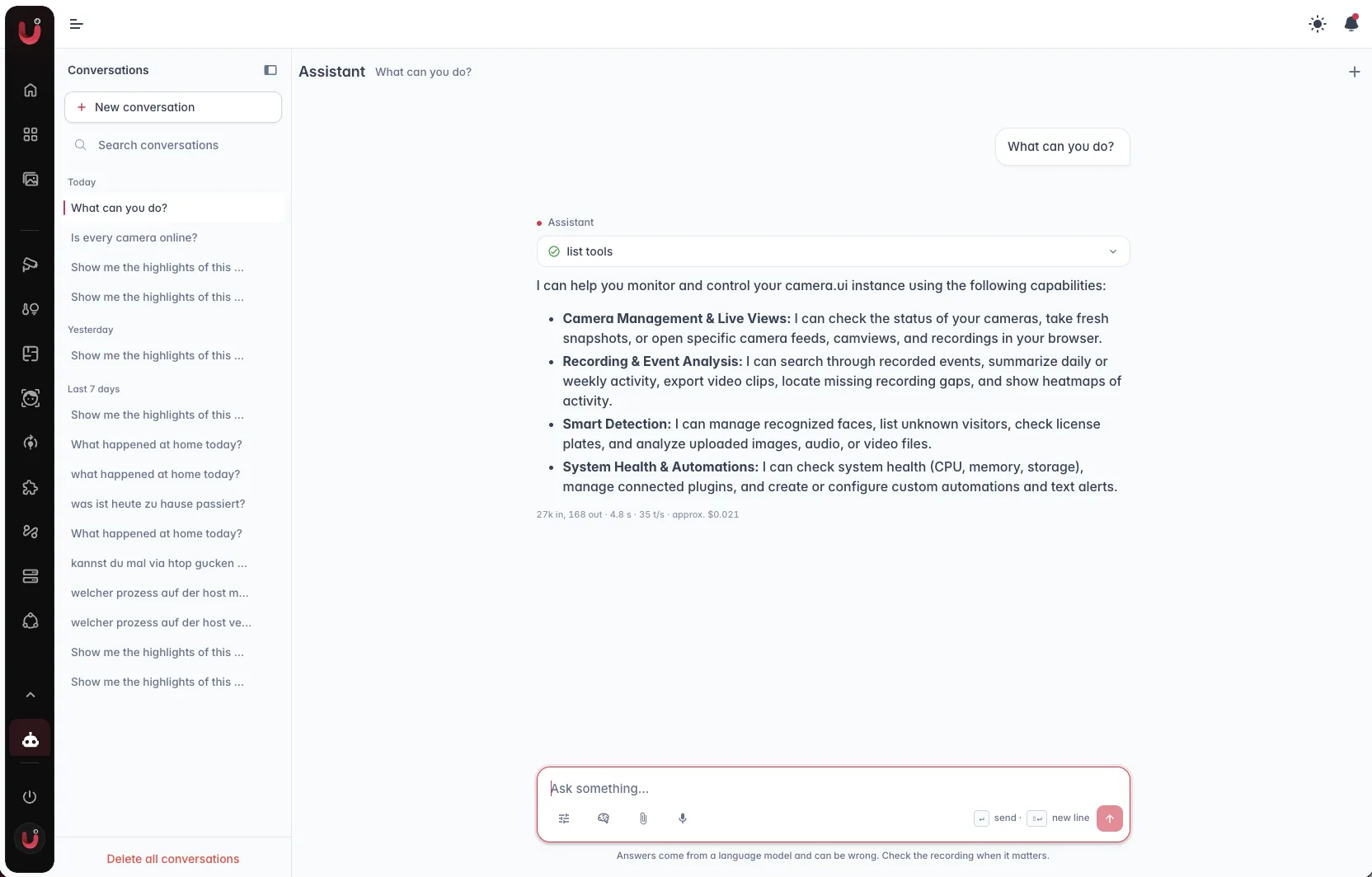
In camera.ui the assistant is part of the app, in the browser and in the iOS and Android apps, with a microphone if you'd rather talk. Every tool it used shows up as a card with the answer, so you see which events and pictures it looked at, and one tap opens the recording. It also knows the camera.ui docs, and "show me the garden camera" opens that camera.
- Your recordings What happened today, a recap of the week, when someone was last seen, events found by a description. Ask for the clip of a moment and it builds one, or sends it to your phone.
- Asks before it acts Switching a light, running an automation or sending a push is shown to you with its values first. It runs once you choose Allow.
- Automations from a sentence "When someone is on the terrace after 10 p.m., send me a push with a picture" becomes a flow in the automation editor, created after you allow it.
- Keeps watch "Let me know when a delivery person comes" turns into a text alert with a push and the picture. Nothing goes to the model in between, it only looks once a camera records something. This needs a CLIP plugin.
- Answers on a schedule A summary of the day every evening, as a push or a saved conversation.
camera.ui over MCP
The same tools are available over MCP. Turn on Enable MCP endpoint under Settings → Assistant and create an API token in your account. camera.ui then shows the setup for Claude Code, Claude Desktop, Cursor, Windsurf and VS Code. For Claude Code it's a single command:
claude mcp add --transport http camera-ui \
  https://<camera.ui address>/api/assistant/mcp \
  --header "Authorization: Bearer <api token>"
The model comes from Claude or Cursor, camera.ui doesn't need one of its own for this. Only reading tools are offered at first, Allow changes adds the rest. camera.ui can't ask for confirmation over MCP, so the app has to do it. Claude Code and Claude Desktop ask before every tool call. The tools follow the role of whoever owns the token, so a user's token never sees admin tools.
It works the other way round too. Add Home Assistant's MCP server under External MCP servers, and the camera.ui assistant switches lights and scenes through Home Assistant and can use them in automations. More on the two together in our Home Assistant NVR comparison.
Which model
For a chat with your cameras the model has to call tools. Cloud models from OpenAI, Anthropic or Google do that well. Locally, Ollama works with models that support tools, and one that also reads pictures can look at snapshots. When you save a model, camera.ui tests both and shows the result as a badge in the list.
Small local models lose track sooner in long conversations. Enter their context window in the model's settings, and camera.ui plans each request to fit. For descriptions of your events, the same model can do double duty, see our guide to AI camera notifications.
What it costs
The assistant and the MCP endpoint are part of the free camera.ui, and so are the tools for cameras, sensors and the system. Everything that reads recordings, from the day's recap to the clip, needs recording and so camera.ui Pro, from $39 a year for four cameras. The model costs whatever your provider charges, and camera.ui shows an estimate under each answer. A local model costs nothing but power.
Try it with your cameras
camera.ui runs on Mac, Windows and Linux, in Docker and as a Home Assistant app.
All logos and names are trademarks of their respective owners.